
The Hidden Technical Tradeoffs Behind Great GenAI Products
A Practical Guide for AI PMs on Compute, Latency, and Context

In my old PM life, the hardest tradeoffs were scope, timelines, and stakeholder buy-in. In GenAI products, the hardest tradeoffs quietly shifted: compute, latency, and context.
You can’t see them in the UI, but they quietly decide which features are viable, which users get a “wow” moment, and which launches end up too slow or too expensive to sustain.
One of the biggest mindset shifts when you move into model-heavy products is this:
You’re no longer just prioritizing features and engineering resource — you’re going one level deeper into the tech stack and prioritizing model selection, GPUs, and latency.
As a model PM, I’ve found that the most impactful decisions I make aren’t just “Which feature should we build next?” but “What do we optimize for, given our compute budget and user needs?”
In this post, I’ll walk through three technical tradeoffs I keep coming back to as a model PM—and what they actually mean for how you do the job:
Compute (inference cost) as your new unit economics
Latency as part of your UX
Context window as a product surface
Much of this comes from my own working notes on technical tradeoffs for AI products and applies to compute-intensive applications such as generative media, multimodal LLMs, and vertical agents.
If you’re a PM or product leader who wants to deepen your technical intuition, or you’re curious what it’s really like to be an AI PM, I hope this gives you a useful starting point. And if you’ve run into similar tradeoffs in your own work, I’d love to hear your learnings in the comments!
Compute Is Your New Unit Economics
I used to think about “cost” as headcount or marketing budget. As a model PM, I’ve had moments where a single AI feature, if shipped naively, would have wiped out the margin for an entire product line. Nothing was wrong with the UX; the problem was that every click quietly translated into expensive GPU time.
That’s inference cost: the cost of running your model to serve real users.
At a high level, you can think of it as:
Inference cost ≈ (# passes) × (# GPU-seconds per pass) × ($ per GPU-second)
A “pass” might be a model call or stage in a pipeline (e.g., classify → plan → generate). GPU-seconds depend on model size, sequence length, and how efficiently you serve requests. Dollars per GPU-second depend on your infra choices (self-hosted vs managed, GPU type, accelerators, etc.).
There are three big levers behind the scenes:
Product-level optimization to reduce the number of passes
Model-level optimization to reduce GPU-seconds per pass
Infra-level optimization to reduce $ per GPU-second
Lever 1: Product-level optimization to reduce the number of passes
You can make the product smarter so you need fewer model calls to deliver value. For example:
Improve first-pass quality so users don’t need multiple “regenerate” or refinement loops
Prompt engineering & templates: design system prompts and UX so the model gets all necessary context up front
Task specificity & model routing: capture clear user intent (e.g., “summarize,” “translate,” “debug this”) so you can send simple tasks to smaller/cheaper models, reserving large models for complex reasoning
Lever 2: Model-level optimization to reduce GPU-seconds per pass
This is where model architecture and infra come in:
Model pipeline optimization: Chain multiple models so that heavy reasoning is done only when needed. Use smaller and less expensive models for tasks like classification, filtering, or scoring, and reserve the largest models for the hardest reasoning or generation steps.
Model training & distillation: When you have full control of your own models, you can apply modern fine-tuning techniques such as LoRA (Low-Rank Adaptation) to adapt a base model more efficiently and reduce training cost. You can also distill smaller “student” models to mimic a larger “teacher” model and deploy these students in production for better latency and cost.
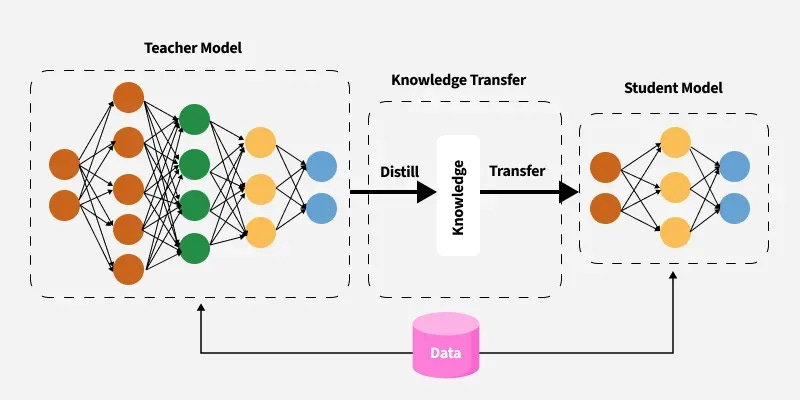
GeeksforGeeks: LLM Distillation
Lever 3: Infra-level optimization to reduce $ per GPU-second
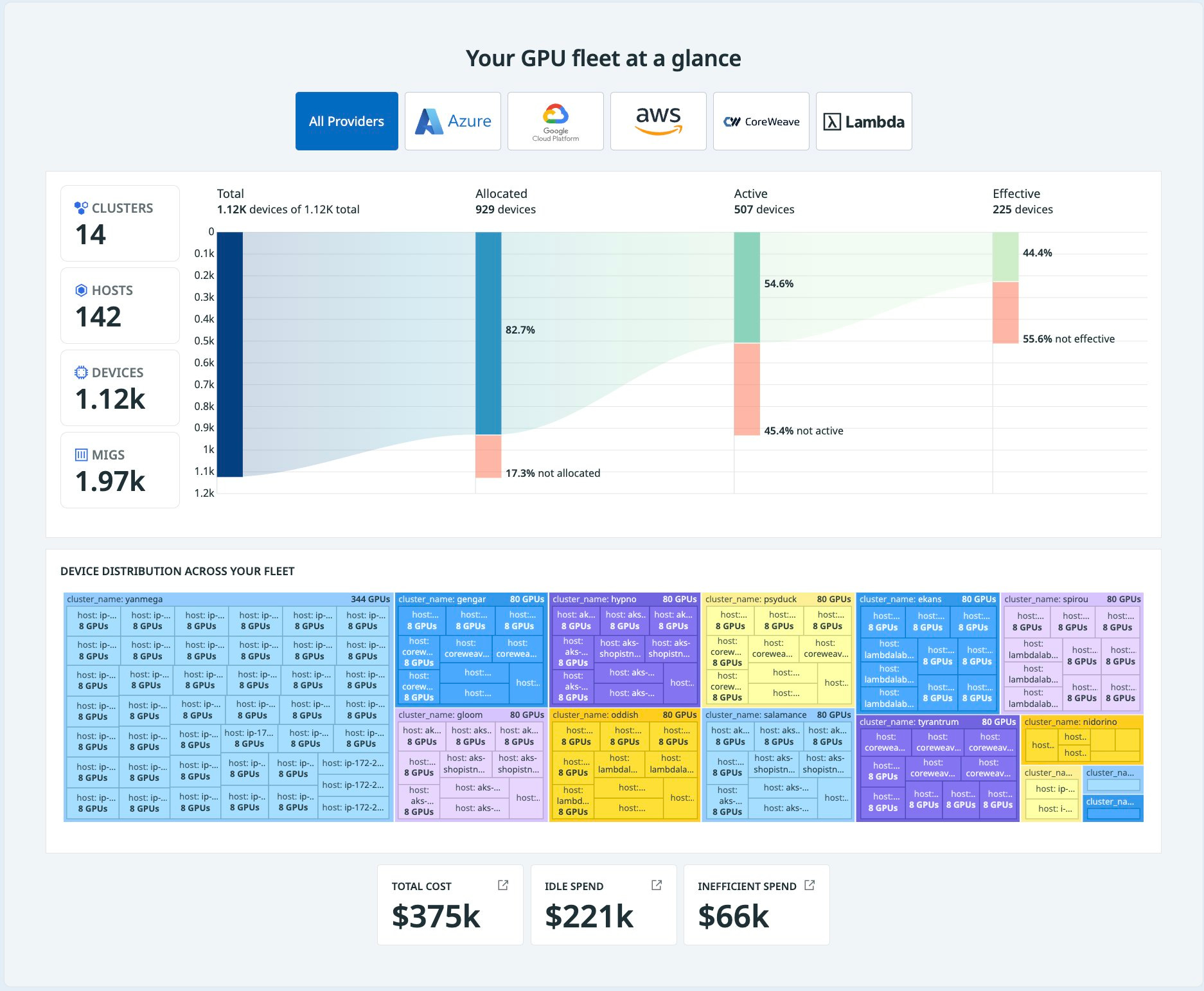
Even with the same model and workload, infra choices matter for large-scale teams (less relevant for small startups or when your user base is small):
GPU type & hardware: inference-optimized GPUs (like NVIDIA’s L4/T4 class) or custom accelerators (e.g., TPUs) may be cheaper per token for certain workloads
Self-hosting vs. cloud API: trade flexibility, engineering overhead, and capital expenditure against per-token API pricing
Serving efficiency: batching, right-sizing containers, smart autoscaling, regional placement, and orchestration all impact how much “waste” you have when you are serving AI products at scale (and across teams)
🔍 What this means for PMs
You don’t need to pick the GPU type, but you do need to treat compute as a first-class product constraint, not an afterthought.
1. Treat compute like a product constraint, not a surprise
Understand cost per 1,000 tokens or cost per action (e.g., “per generated video,” “per coaching session”) and whether it will be a bottleneck at the target scale for your product launch
Track inference cost as a KPI when the product enters a mature and scaling stage
Set guardrail budget and clear why: “Here’s roughly what this will cost per active user per month, and here’s why it’s worth it.”
2. Design UX that is compute-aware
Capture intent in a structured way (modes, templates, sliders) so you can route simple tasks to cheaper models and reserve your most powerful models for moments where they actually move the needle.
For heavier operations, consider asynchronous flows or “preview then refine” designs instead of forcing everything into a single blocking call.

3. Influence model strategy through product insight
You’re uniquely positioned to know:
Which user segments actually need top-tier quality vs “good enough but fast”
Which use cases justify premium tiers/pricing because of their compute intensity
Where small models + good UX can outperform “big model brute force”
When you can say, “We can cut compute by 40% with no meaningful loss in user success by routing 70% of traffic to a smaller model,” you stop being just the feature owner — you become a business partner to infra and ML.
Latency Is a UX Feature, Not Just an Infra Metric
We’ve all used AI products that feel dumb even when the model is good. Often the culprit is latency: long “thinking…” spinners, slow first tokens, or outputs that arrive just after the user has given up and moved on.
From an infra point of view, you’ll hear about capacity/throughput and latency:
Capacity / throughput: how many requests the system can serve per second
Latency: how long it takes to serve a single request
They’re connected but not the same. You can have high throughput with bad latency (great at bulk processing, terrible for interactive UX) or low latency with tiny throughput (great for demos, bad for production scale).
For LLMs, this gets trickier because throughput often improves when you batch requests together, but batching can increase latency for any one user if you’re not careful. Infra teams tune batch sizes, autoscaling policies, and routing strategies to juggle these tradeoffs. They may also prioritize some queues over others (e.g., paid users, certain products, or internal APIs).
The problem is that, without clear product guidance, everyone is “optimizing” without a shared definition of what “fast enough” actually means.
🔍 What this means for PMs
Your job is to turn latency from an abstract infra concern into a concrete UX requirement.
1. Set clear latency SLAs in product terms
For each major surface, decide what “fast enough” feels like in a measurable way:
The first token of chat responses should appear within a few hundred milliseconds
Video generation might take minutes but is acceptable if framed as a background job;
Summarization should complete before the user finishes a small interaction.
Agree with eng on p50/p90/p99 targets so there’s a shared bar, not just vibes.
2. Be explicit about where low latency truly matters and for whom.
Also explicitly define quality vs latency tradeoffs in product language:
“Users are okay with a 200–300ms delay if it improves relevance by X%.”
“Users prefer a fast, slightly worse suggestion to a slow, perfect one in this context.”
3. Prioritize use cases and segments when capacity is limited
In a constrained world, not every user and not every action can get the best latency. So you might decide:
Which use cases are “Tier 0” (must always be fast and available)
Which segments get premium performance (e.g., paying customers, high-value accounts, or certain verticals)
Whether some compute-heavy features should launch as beta for a narrow audience first
4. Design the UX to respect the latency profile of your features
Start async work as early as possible in realistic ways. If many users duplicate existing content to tweak it, you can pre-compute drafts or assets earlier in the flow instead of waiting for the final click.
Use “background processing” patterns: let users queue heavy tasks and continue other work; set user expectations on how long the task will take; provide clear progress states and completion notifications.
Sharpen user intent (again!) so you’re not over-generating. For example, mode switches like “fast mode” vs “thoughtful mode”, or use structured inputs (e.g., keyframes / storyboard before full video generation)
Lastly, make sure your infra and ML partners are involved in your roadmap planning! When you treat latency as part of the product experience, and not just an SRE dashboard metric, you give your infra and ML partners something real to aim for and you are one step closer to providing a better user experience.
Context Window Is the New Product Surface
One of the most confusing failure modes I see in AI products is when the model seems to “ignore” important information the user knows they provided. Often, nothing is wrong with the model itself; the problem is how we’re feeding it context.
Every model has a context window: the amount of information (measured in tokens) it can “see” in a single request. That includes the system prompt, user input, conversation history, and any retrieved documents or metadata. You can think of it as a sliding window over the conversation and world state: anything outside the window is invisible; anything inside is fair game for the model to attend to.
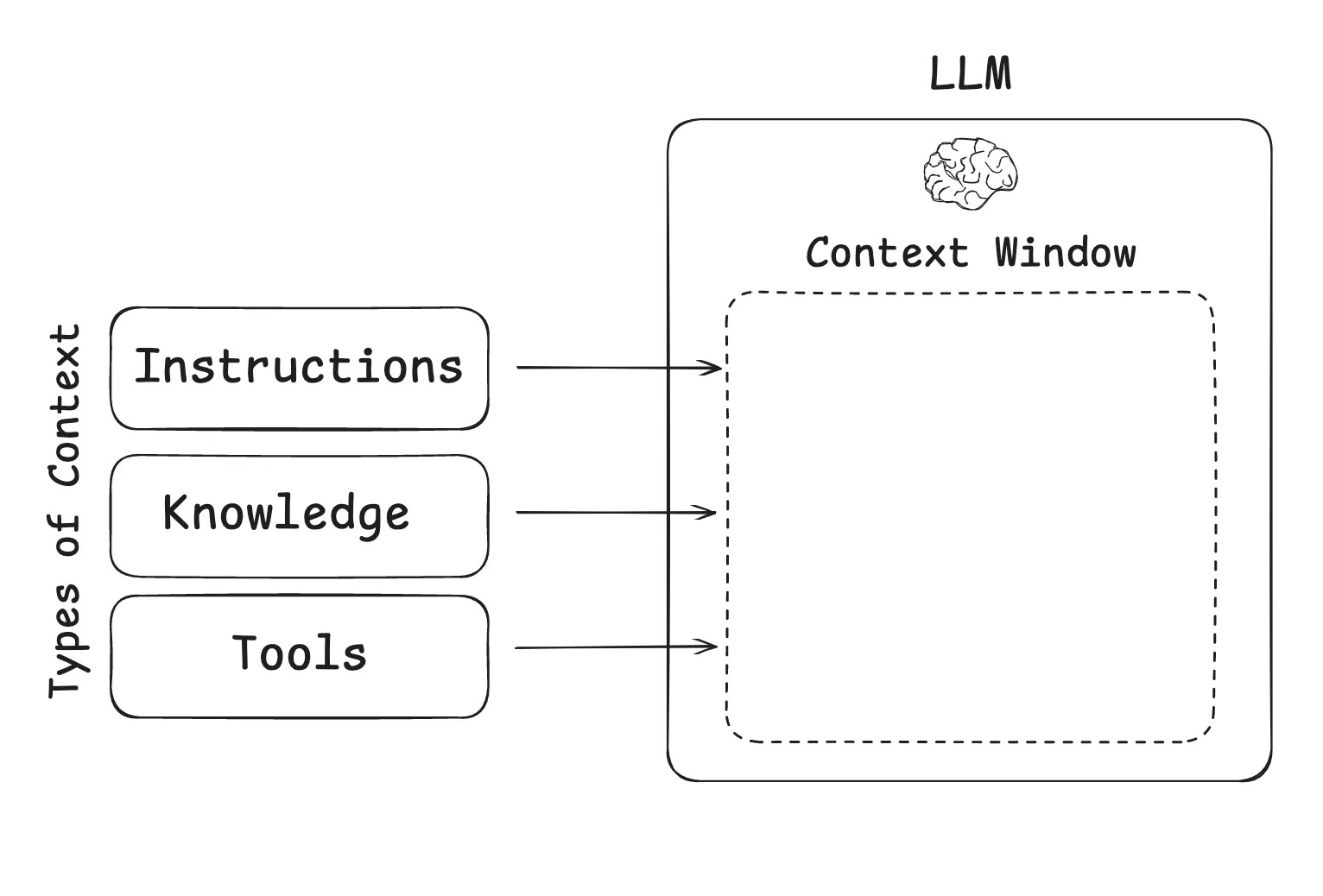
Longer context windows unlock use cases like reading entire docs or codebases, enabling multi-step workflows with long histories, understanding richer “world state” for reasoning (e.g., patient history, legal contracts, product analytics sessions).
But bigger isn’t always better.
Tradeoffs of increasing vs decreasing the context length
When you increase the context window, you get:
Pros
Ability to handle long documents and multi-turn conversations without aggressive chunking or prompt hacks
Potentially more coherent reasoning when the model can see more of the world/state at once
New vertical use cases: e.g., full medical records, long legal briefs, entire sections of code
Cons
Quality/hallucination risk: Models don’t treat every token equally. Important info can get “lost in the noise” of very long prompts, which can hurt accuracy if prompts aren’t structured well
Cost and latency scale up sharply: Attention mechanisms scale roughly quadratically with sequence length, so doubling the context window is much more than double the cost in many architectures
Utilization issues: Most real-world requests may not use anywhere near the max context; you pay for capability that isn’t always exercised
Harder training & data requirements: Long-context training is more complex, data is scarcer, and stability can be trickier
When you constrain the context window, you get:
Lower cost and latency
Simpler explainability (easier to reason about “what the model saw”)
Better fit for on-device or constrained environments
… but you then need strong retrieval, chunking, and UX to make that limited context feel powerful.
How teams decide on the context length
In practice, nobody just asks “What’s the biggest context we can afford?”
The better question is: “for our primary use cases, what context do we need to deliver a magical experience — and what’s an acceptable ceiling for edge cases?”
Teams typically:
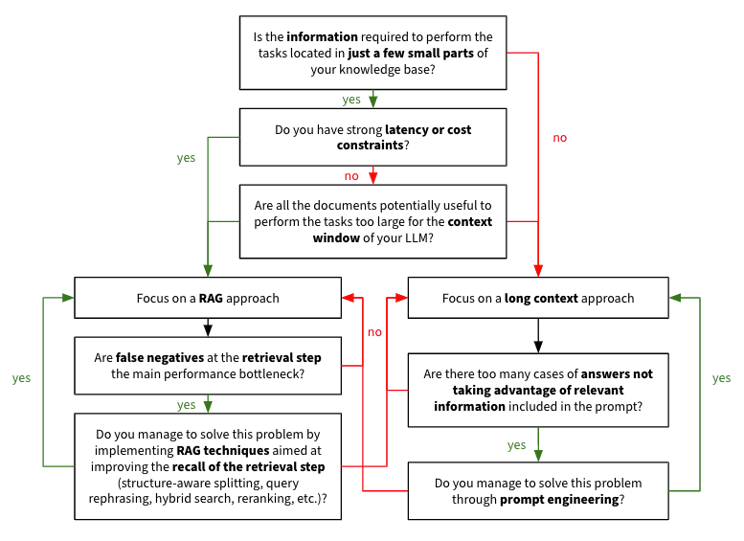
Start from canonical workflows (e.g., “upload your spec and ask questions,” “review a full sales call,” “analyze a log file”) for the top use cases and estimate typical input size and 95th percentile
Optimize system prompts and decide whether RAG / chunking / summarization can handle outliers instead of paying for ultra-long context all the time.
Consider whether different tiers / plans should unlock larger context
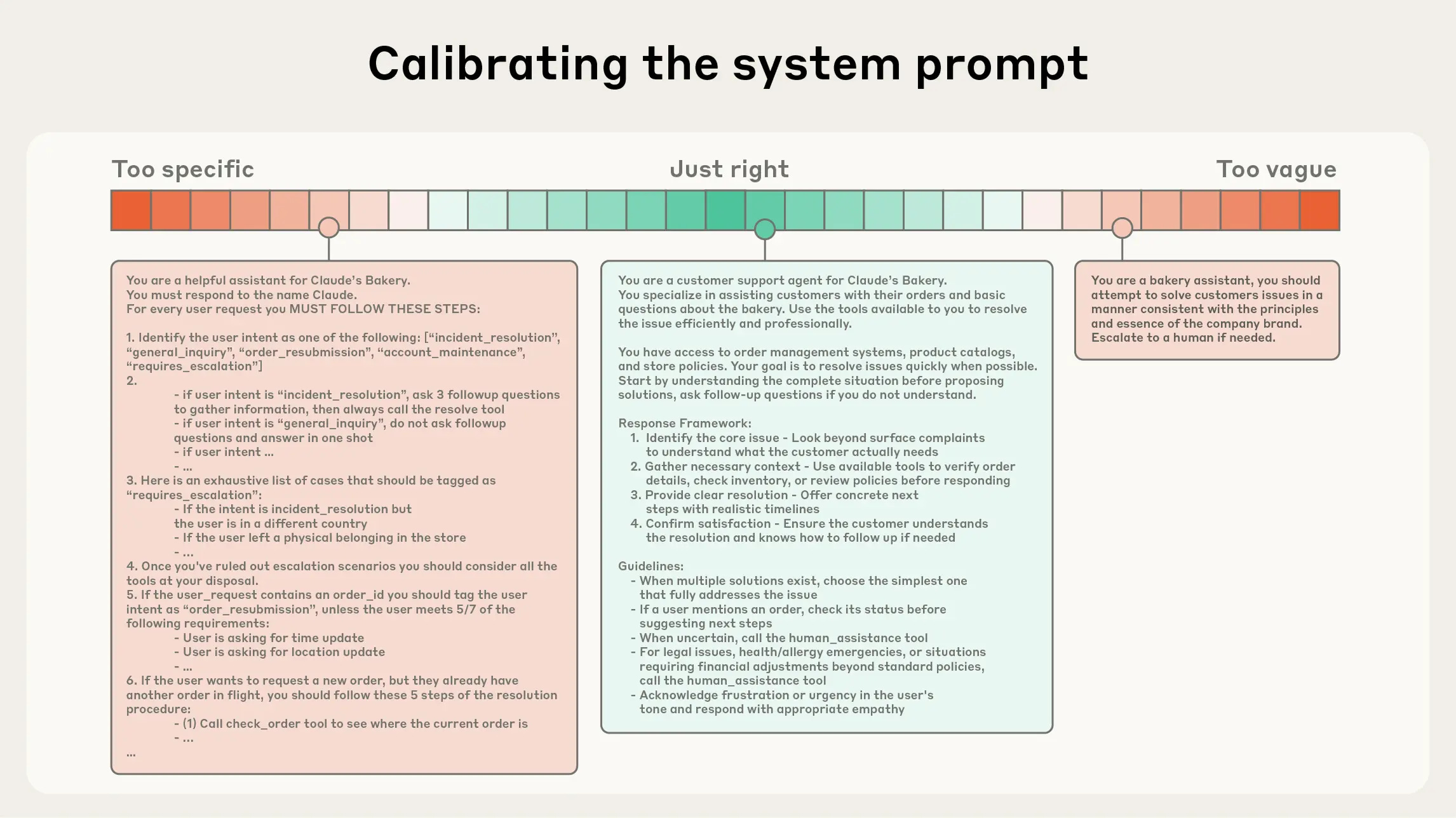
Given that LLMs are constrained by a finite attention budget, good context engineering means finding the smallest possible set of high-signal tokens that maximize the likelihood of some desired outcome [ref].
Many mature model teams also run experiments and testing to see what the most optimal context length is for their top use cases.
🔍 What this means for AI PMs
As an AI PM, your job isn’t to push for “bigger context” in general, but to be precise about what the model actually needs to see for each task.
Articulate the most relevant context. For each core workflow (answering a question about a document, refactoring code, summarizing a call, drafting an email), you can write down what the model truly needs: which parts of a document, which user attributes, which logs or metadata. That gives eng/ML a clear specification for what should be retrieved, cached, or always included in the prompt and what can safely be left out.
Build intuition for the upper bound your top use cases really require. For example:
A simple chat helper might only need a small window over the recent conversation, plus a short reference.
A coding agent may need to reason over an entire codebase.
A medical or legal agent may need to ingest long histories or large files.
Your job is to map your main use cases to rough context needs (typical vs edge cases) and decide where you truly need long context versus where chunking, retrieval, summarization, or multi-step flows are good enough.
Define clear workflows and evaluation criteria so eng can make tradeoffs. That means documenting a few canonical “golden paths” end to end and agreeing on how you’ll measure success: for example, whether the model can correctly answer questions that rely on information buried deep in a long input, or how its accuracy degrades as input length grows. Once these workflows and evals are in place, the team can have concrete discussions about smaller vs larger context windows, where to invest in retrieval or summarization, and how context limits might differ by user tier or product surface.
The better you do these three things — relevant context, realistic upper bounds, and clear evals — the easier it is for the whole team to make smart, aligned decisions about context windows instead of arguing from intuition.
Bringing It All Together
Stepping into AI product management doesn’t mean you need to become an infra engineer or an ML researcher. But it does mean your product decisions are now tightly coupled to compute, architecture, and serving behavior.
If you remember nothing else, remember this:
Compute is your new unit economics. See inference cost as a core driver of business viability, not just an infra line item. Know what each feature costs to run and whether that tradeoff is worth it.
Latency is part of your UX. Own the capacity vs latency story for your product: who gets what level of performance, and why. Decide what has to feel conversational and what can be a background job.
Context is a product surface. You decide what the model gets to see for each task, and what “good enough” context looks like for your use cases. Argue for or against ultra-long context in terms of user value.
When you can confidently walk into a room with ML and infra leads and say:
“Here are the top workflows we’re optimizing for.”
“Here’s what we’re willing to trade off on context, latency, and cost.”
“Here’s how we’ll segment users and features to match our compute reality.”
… you stop being “the PM who writes specs” and become the co-architect of the system.
That’s the bar for AI PMs now, and it’s also what makes this work so fun.
This article comes at the perfect time, your breakdown of the hidden GenAI tradeoffs is truely insightful. Doesnt this deeper technical layer just make those product roadmap discussions with non-technical stakeholders even more... conceptual?
Outstanding breakdown of how GenAI shifts PM work from feature prioritization to infrastructure economics. The compute-as-unit-economics framing is spot-on, especially the three-lever model (product/model/infra). Most teams still treat latency as an SRE problem instead of a UX constraint, but the "fast mode vs thoughtful mode" example shows how productdesign can directly shape compute budgets. The context window tradeoffs piece is underrated, tho.